


Download Gameshow – Live Streaming Software for Gamers, Free Trial, Easy Setup
Overview
The world of online gaming has exploded thanks to e‑sports, and the demand for real‑time, high‑quality live streams has never been higher. Gameshow answers that call with a purpose‑built streaming solution that removes the technical barriers that once kept casual gamers from sharing their gameplay. Whether you’re chasing a spot on Twitch, building a community on YouTube Gaming, or testing the waters on emerging platforms like HitBox, Gameshow gives you a polished, professional‑looking broadcast in just a few clicks.
The software arrives with a 30‑day free trial, so you can explore every feature without spending a dime. When the trial ends, a single low‑cost license unlocks a lifetime of updates, ensuring you stay current with the latest streaming standards. Gameshow isn’t just another piece of bulky broadcasting gear; it’s a streamlined, beginner‑friendly tool that also offers depth for seasoned streamers who want custom overlays, green‑screen effects, and multi‑source audio control.
In short, Gameshow lets you focus on the game you love while the software handles the polish, reliability, and monetization pathways that can turn a hobby into a career.
Features & Customization
- Game‑Specific Templates: Pre‑loaded overlays for popular titles such as League of Legends, Fortnite, and StarCraft II, complete with themed backgrounds, logo slots, and animated borders.
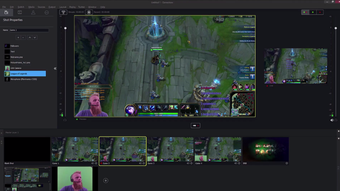
- Drag‑and‑Drop Editor: Build or modify your own layout in real time – place picture‑in‑picture windows, adjust webcam size, and set banner positions without coding.
- Green‑Screen & Virtual Backgrounds: Replace your real‑world background with a fantasy dungeon, space station, or any custom image using chroma‑key technology.
- Audio Suite: Integrated microphone support, background‑noise cancellation, and separate volume sliders for game sound, voice chat, and music tracks.
- One‑Click Multi‑Platform Publishing: Link Twitch, YouTube, HitBox, or any RTMP‑compatible service and start streaming with a single button press.
- Performance Optimizer: Adaptive bitrate control and GPU‑accelerated encoding keep frame rates high while preserving stream quality on modest hardware.
- Analytics Dashboard: Real‑time viewer count, chat overlay, and post‑stream reports help you track growth and refine content strategy.
- Monetization Ready: Built‑in support for donation alerts, subscriber badges, and sponsor banners without third‑party plugins.
What sets Gameshow apart from competing products is the balance between simplicity and depth. New streamers can launch a polished broadcast by selecting a template, entering their streaming credentials, and hitting “Go Live.” At the same time, power users can dive into the editor, create layered scenes, and fine‑tune encoding presets for 1080p60 or 4K streams. The software also includes a library of royalty‑free sound effects and transition animations, which can be dropped into any scene to add personality. Because Gameshow is constantly updated, new game templates and feature enhancements are rolled out automatically, ensuring you never fall behind the evolving standards of the streaming community.
Installation, Usage & System Requirements
Step‑by‑Step Installation
- Visit the official Gameshow website and click the Download Free Trial button for your operating system.
- The installer (GameshowSetup.exe for Windows or Gameshow.dmg for macOS) will launch; follow the on‑screen prompts to accept the license agreement and choose an installation folder.
- After installation, launch Gameshow. The first‑time wizard will ask you to create a free account or sign in with an existing one.
- Connect your webcam and microphone. Gameshow will automatically detect supported devices and run a quick calibration test.
- Navigate to the Accounts tab, select your preferred streaming platform (Twitch, YouTube, HitBox, etc.), and paste your stream key or use OAuth authentication.
- Choose a template from the Templates gallery, customize any overlay elements you like, and click Save as My Scene.
- Press the Go Live button. Your stream will instantly start broadcasting to the selected service.
Usage Tips for a Smooth Broadcast
Once you’re live, Gameshow’s control panel lets you toggle webcam visibility, mute/unmute your mic, and switch scenes with hotkeys (default F1‑F12). The built‑in chat overlay can be docked on the side of the screen, so you never miss viewer interaction. If you notice performance hiccups, open the Settings → Performance panel and enable “Low‑Latency Mode” or adjust the bitrate down by 500 kbps increments. For those who stream on a laptop, plug in a USB‑C power source and enable the “Battery‑Saver” mode to prevent throttling.
Compatibility
Gameshow runs on modern desktop environments:
- Windows: 10 (64‑bit) and later – requires DirectX 12 and at least 4 GB RAM.
- macOS: 11 (Big Sur) and later – Intel or Apple Silicon (Rosetta 2 translation included for the latter).
- Linux: Experimental support via Snap package; works on Ubuntu 20.04+ with a compatible GPU driver.
Pros and Cons
Pros
- Intuitive drag‑and‑drop editor makes customization fast for beginners.
- Extensive library of game‑specific templates reduces setup time.
- Green‑screen and virtual background support without extra plugins.
- One‑click publishing to multiple platforms eliminates manual RTMP configuration.
- Low‑cost lifetime license after the free trial.
- Regular updates add new games, features, and performance optimizations.
Cons
- No native mobile app for on‑the‑go streaming.
- Linux support is still experimental and may require additional tweaking.
- Advanced users may miss the depth of scripting found in OBS Studio.
- Higher CPU usage when using multiple high‑resolution overlays.
Frequently Asked Questions
Is Gameshow really free to try?
Yes. You can download a 30‑day full‑feature trial without providing credit‑card information. All streaming capabilities are unlocked during the trial period.
Can I use Gameshow with a capture card?
Absolutely. Gameshow detects most HDMI capture devices (Elgato, AVerMedia, etc.) automatically. Just select the capture source in the video settings panel.
Does Gameshow support multi‑camera setups?
Yes. Up to four video sources can be added and positioned independently. This is useful for showing a face cam, a console feed, and a separate reaction camera.
What streaming quality can I achieve on a typical home internet connection?
Gameshow adapts to your upload bandwidth. With a stable 10 Mbps upload you can comfortably stream 1080p at 60 fps. Lower connections can drop to 720p30 or even 480p while maintaining smooth gameplay.
Is there a way to monetize my stream directly from Gameshow?
Gameshow integrates with Twitch alerts, YouTube Super Chat, and third‑party donation services. You can embed custom donation banners and set up subscriber‑only overlays without extra software.
Conclusion – Start Streaming Today
If you’ve been waiting for a hassle‑free way to launch a professional‑looking broadcast, Gameshow delivers exactly that. The blend of ready‑made templates, a powerful yet simple editor, and seamless multi‑platform support makes it the ideal launchpad for anyone eager to join the e‑sports streaming scene. Whether you’re a teenager dreaming of a gaming career or an experienced creator looking for a more efficient workflow, the low‑cost lifetime license after the free trial ensures you won’t be stuck paying for expensive upgrades. Download Gameshow now, claim your 30‑day trial, and turn every victory into a show‑stopping performance for the world to see.







